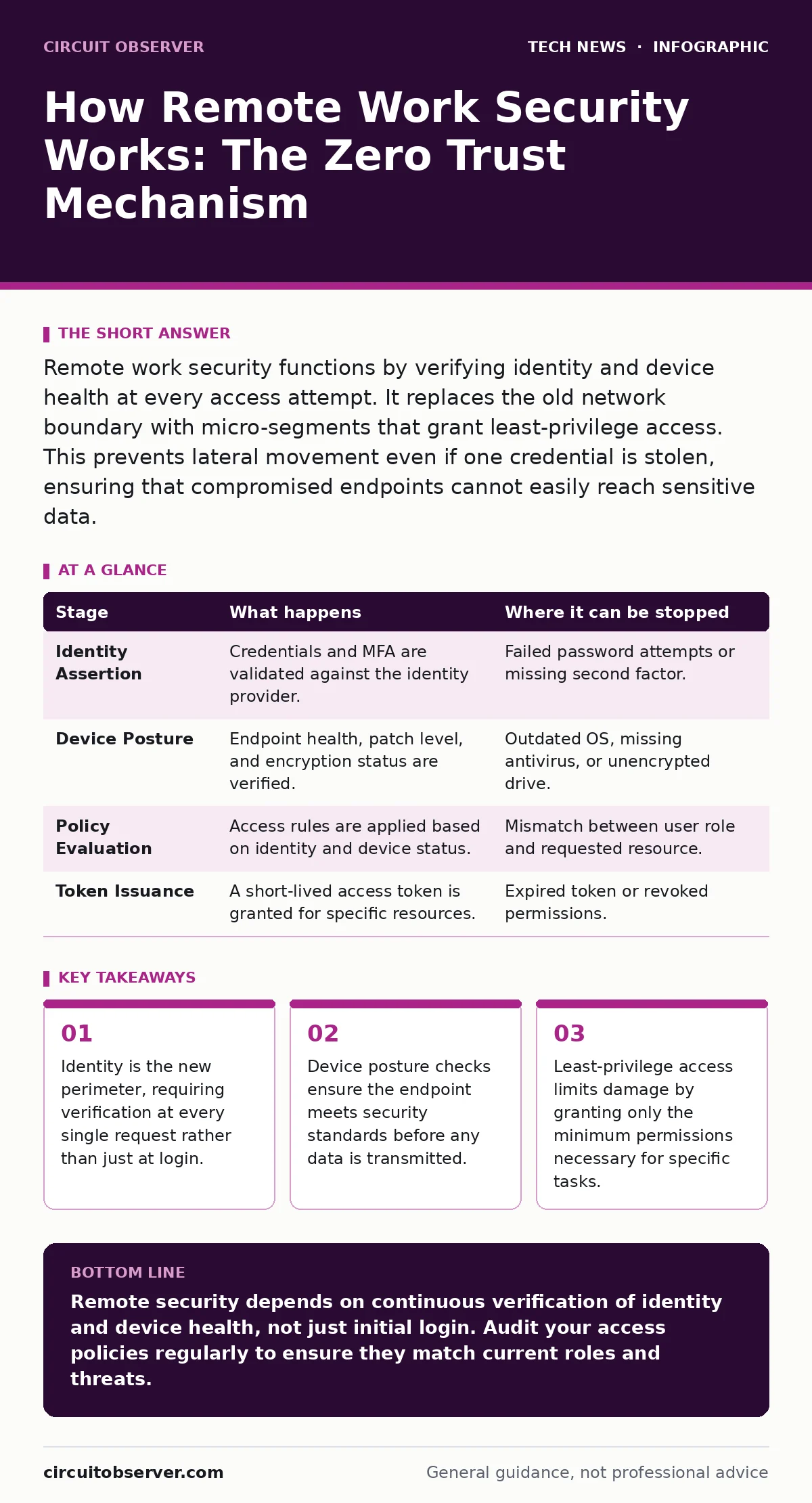
Remote work security functions by verifying identity and device health at every access attempt. It replaces the old network boundary with micro-segments that grant least-privilege access. This prevents lateral movement even if one credential is stolen, ensuring that compromised endpoints cannot easily reach sensitive data.
The Shift from Perimeter to Identity
Traditional network security relied on a hard boundary. Once inside the corporate firewall, users were trusted implicitly. Remote work dissolves this boundary. Your home network is untrusted by default. The system must verify who you are and what device you use for every single interaction. This approach is known as Zero Trust. It assumes breach and verifies explicitly.
The mechanism does not rely on location. It relies on attributes. Your identity, your device health, and the context of the request are evaluated continuously. If any attribute fails the check, access is denied. This happens silently in the background. You do not see the checks, but the system enforces them strictly.
Stage 1: Identity Assertion
The process begins when you attempt to access a resource. You present credentials. These are usually a username and a password, but modern systems require more. Multi-factor authentication adds a second layer. This might be a code from an app or a hardware key. The identity provider validates these claims. It checks if the account exists and if the credentials match.
This stage is not just about passwords. It looks at behavioral signals. If you log in from a new country, the system flags it. It may challenge you with additional verification steps. This dynamic adjustment helps stop automated attacks. Bots often try to guess passwords at high speed. The system can detect this pattern and block the IP address temporarily.
Device Posture and Context
Identity alone is insufficient. A stolen password on a clean device is less dangerous than a legitimate password on an infected machine. The system checks the health of your endpoint. This is called device posture assessment. It verifies that your operating system is patched. It checks for the presence of antivirus software. It ensures encryption is active on the drive.
If your device fails these checks, access is restricted. You might be allowed to browse the web but denied access to sensitive files. This segmentation prevents malware from spreading. Even if your computer is compromised, the attacker cannot reach the core data. The system treats your remote device as an untrusted entity until proven safe.
| Stage | What happens | Where it can be stopped |
|---|---|---|
| Identity Assertion | Credentials and MFA are validated against the identity provider. | Failed password attempts or missing second factor. |
| Device Posture | Endpoint health, patch level, and encryption status are verified. | Outdated OS, missing antivirus, or unencrypted drive. |
| Policy Evaluation | Access rules are applied based on identity and device status. | Mismatch between user role and requested resource. |
| Token Issuance | A short-lived access token is granted for specific resources. | Expired token or revoked permissions. |
Policy Evaluation and Least Privilege
Once identity and device health are confirmed, the system evaluates policy. It determines what you are allowed to do. This follows the principle of least privilege. You get only the access needed for your current task. You cannot access all data in the system. You can only see what your role requires.
This evaluation happens in real time. If your role changes, your access changes immediately. There is no lag. This prevents former employees or changed roles from retaining old privileges. The system also considers the sensitivity of the data. Highly sensitive data may require additional checks. This might include biometric verification or a secure network connection.
Token Issuance and Session Management
After passing all checks, the system issues a token. This token proves your identity to the resource server. It contains your permissions and expiration time. The token is short-lived. It expires quickly to limit exposure. If the token is stolen, it is useless after a short period.
The resource server validates the token before serving data. It does not trust the client. It trusts the token issuer. This decouples authentication from authorization. The identity provider handles login. The resource server handles access. This separation improves security and scalability. It allows for centralized management of identities.
Continuous Monitoring and Adaptation
Security is not a one-time event. It is continuous. The system monitors your session for anomalies. If you suddenly access a large volume of data, it flags the activity. If you attempt to download files to an external drive, it may block the action. This is real-time risk assessment.
The system adapts to threats. If a new vulnerability is discovered, policies can be updated globally. All users are affected immediately. There is no need to reconfigure individual devices. This agility is critical in remote work. Threats evolve quickly. Static rules become obsolete fast. Dynamic policies ensure protection remains current.
For a deeper look at how identity standards facilitate this process, see our guide on SAML. Understanding how tokens are exchanged helps in troubleshooting access issues.
See also: Can Two-Factor Authentication Be Hacked? Methods and Defenses · SAML Misconceptions: Why Your Single Sign-On Implementation Fails
Limits and Trade-offs
This model has limits. It increases complexity. Users may face friction. Additional verification steps can slow down work. Administrators must balance security with usability. Too many checks lead to user fatigue. Users may find ways to bypass security. This creates new risks.
Device posture checks can fail on older hardware. Legacy systems may not support modern security protocols. This creates gaps in coverage. You must maintain a baseline of supported devices. Anything below this baseline cannot be secured adequately. This may require replacing old equipment.
Integrating Endpoint and Network Controls
Remote security does not exist in isolation. It works with other controls. Your device must be secure. This includes disk encryption and firewall settings. See our guide on BitLocker for details on drive encryption. It ensures that if your laptop is stolen, the data remains unreadable.
Network security also plays a role. Even with Zero Trust, a secure network reduces attack surface. Use strong Wi-Fi encryption. Avoid public networks for sensitive tasks. If you must use them, use a virtual private network. This adds a layer of encryption to your traffic.
For mobile users, device management is critical. See our guide on mobile device security. It covers how to enforce policies on phones and tablets. These devices often have different security models. They require specific configurations to ensure data safety.
The Human Element and Education
Technology cannot stop all threats. Social engineering remains a major risk. Attackers target people, not just systems. They trick users into revealing credentials. No amount of technical control stops a user from handing over their password.
Training is necessary. Users must recognize phishing attempts. They must know how to report suspicious activity. Security is a shared responsibility. The system provides tools. Users must use them correctly. Regular training keeps awareness high. It reinforces good habits.
Maintaining Security Hygiene
Remote work changes the environment. Your home network is less secure than the office. You must secure your router. Change default passwords. Update firmware regularly. This prevents attackers from entering your network.
Keep your software updated. Patches fix security holes. Delaying updates leaves you exposed. Automate updates where possible. This ensures you always have the latest protections. Regular maintenance is key. Neglect leads to vulnerabilities.
For details on securing your local network devices, see our guide on IoT security. Smart devices can be entry points. Securing them reduces the risk of network compromise.
Key takeaways
- Identity is the new perimeter, requiring verification at every single request rather than just at login.
- Device posture checks ensure the endpoint meets security standards before any data is transmitted.
- Least-privilege access limits damage by granting only the minimum permissions necessary for specific tasks.
Remote security depends on continuous verification of identity and device health, not just initial login. Audit your access policies regularly to ensure they match current roles and threats.
Frequently asked questions
Does Zero Trust replace firewalls?
No, firewalls still filter traffic. Zero Trust adds identity and device checks on top of network controls. They work together to provide layered security.
How often should I verify my device posture?
Every time you access a sensitive resource. Continuous monitoring ensures that your device remains secure throughout the session, not just at the start.
How this guide was produced: written by the Circuit Observer editorial team with AI assistance, checked against the public references listed below, and reviewed when the facts change. See our editorial policy or report an error.