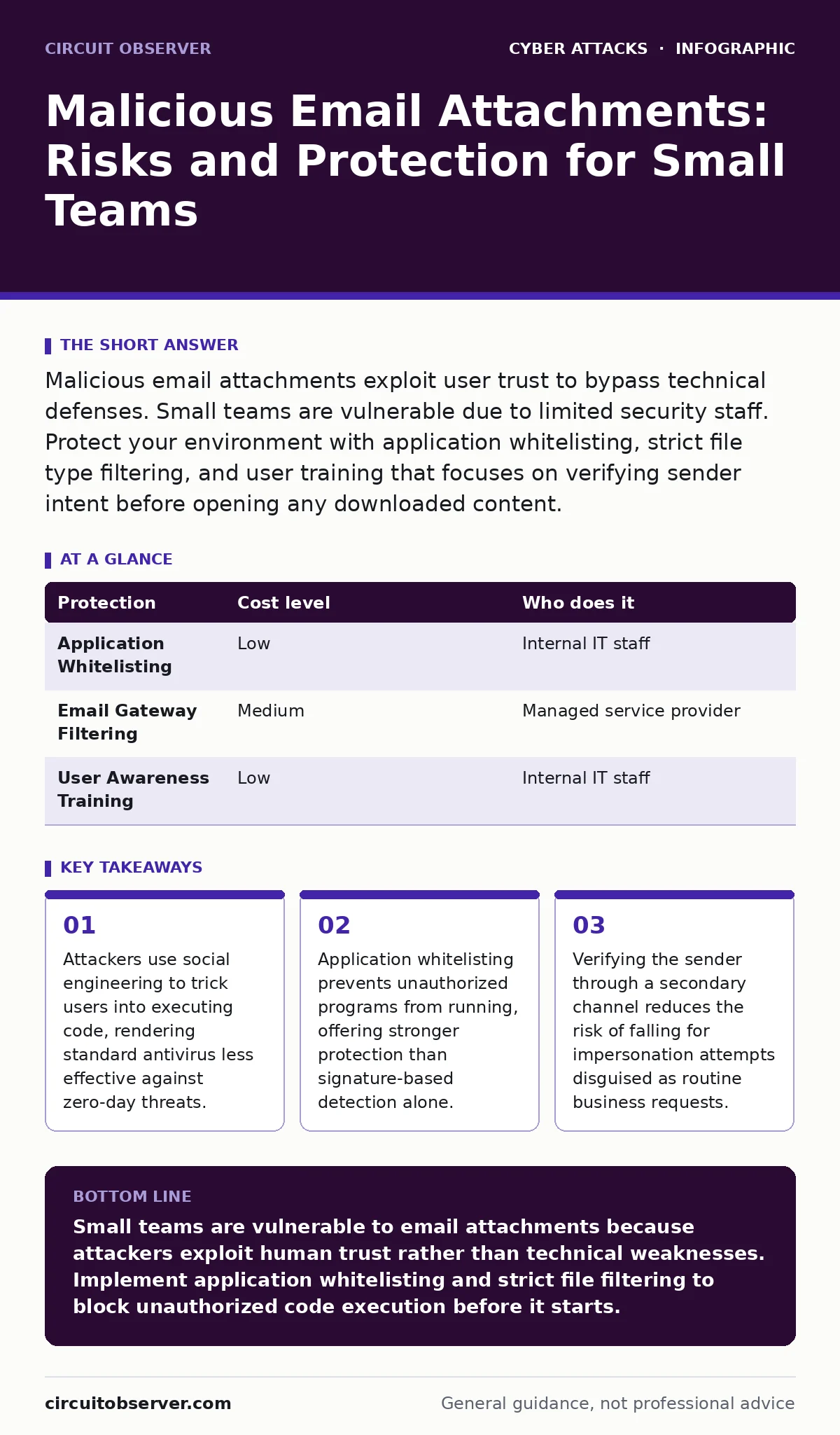
Malicious email attachments exploit user trust to bypass technical defenses. Small teams are vulnerable due to limited security staff. Protect your environment with application whitelisting, strict file type filtering, and user training that focuses on verifying sender intent before opening any downloaded content.
Why Small Organizations Face Disproportionate Risk
Small organizations often lack dedicated security operations centers, creating a blind spot for persistent threats. Attackers recognize that smaller teams rely heavily on generalist IT staff who manage servers, networks, and help desk tickets simultaneously. This resource constraint means fewer eyes on email logs and slower incident response. You become an attractive target because the effort to compromise you is lower than targeting a large enterprise with layered defenses.
The risk stems from human psychology, not just technical weakness. Attackers craft emails that mimic legitimate business processes, such as urgent invoice requests or policy updates. You are more likely to open these files because they align with your daily responsibilities. The attachment contains code that runs silently, establishing a foothold before any alert triggers. This initial access is often the hardest step for attackers, making the social engineering component the most critical vector.
The Mechanics of Attachment-Based Attacks
Malicious attachments exploit vulnerabilities in how software parses files. A PDF may contain JavaScript that executes when you open it, while a Word document might use macros to run commands on your system. These mechanisms bypass traditional perimeter defenses because the email itself appears benign. The danger lies in the execution phase, where the malicious code interacts with your operating system.
Attackers often use polymorphic code, which changes its appearance each time it is created. This variation defeats signature-based antivirus solutions that look for known patterns. You might scan the file and receive a clean report, yet the code remains dangerous. The attack succeeds when you grant the application the permissions it needs to modify system files or network connections. Understanding that the file type determines the risk level helps you prioritize your defensive measures.
Low-Cost Protections for Limited Budgets
You do not need expensive security suites to mitigate attachment risks. Application whitelisting is a highly effective, low-cost strategy. This method allows only approved applications to run on your systems. If an attacker downloads a malicious executable, the operating system blocks it because it is not on the approved list. This prevents execution even if the file bypasses email filters.
File type filtering provides another layer of defense. Configure your email gateway to block high-risk extensions, such as executable files, scripts, and compressed archives. These file types are common carriers for malware. While legitimate business needs may occasionally require them, the default posture should be denial. You can create exceptions for specific users or projects, but this requires strict oversight. Combining these two controls creates a strong barrier against automated attacks.
| Protection | Cost level | Who does it |
|---|---|---|
| Application Whitelisting | Low | Internal IT staff |
| Email Gateway Filtering | Medium | Managed service provider |
| User Awareness Training | Low | Internal IT staff |
The Hidden Cost of Over-Reliance on Antivirus
Traditional antivirus software relies on known signatures of malicious files. This approach fails against new or customized malware that has never been seen before. You might assume that updated antivirus provides complete protection, but it often misses zero-day exploits. These are vulnerabilities that have no existing patch or signature. Relying solely on antivirus creates a false sense of security that encourages risky behavior.
The hidden cost is the delay in detection. A signature-based tool may not flag a novel threat until after it has executed and spread. By then, the attacker has already established persistence within your network. You lose valuable time identifying the breach and containing the damage. Supplementing antivirus with behavioral analysis or application control reduces this blind spot. Behavioral analysis looks for suspicious actions, such as unexpected network connections, rather than just file content.
Questions to Ask Your IT Provider
When evaluating an IT provider, focus on their proactive defense strategies rather than just their reactive capabilities. You need to understand how they handle threats that bypass initial filters. Ask these specific questions to gauge their maturity:
- How do you detect and respond to zero-day exploits that lack known signatures?
- What is your process for verifying the identity of senders before allowing attachments through?
- Do you offer application whitelisting or endpoint detection and response services?
- How frequently do you test your incident response plans with simulated attachment attacks?
These questions reveal whether the provider relies on outdated methods or employs modern security practices. A provider that cannot answer these clearly may not be equipped to handle sophisticated social engineering campaigns. Ensure their contract includes regular reviews of your email security policies and user training programs.
See also: What Is a Vishing Attack: How Voice Phishing Bypasses Security · Why Is Tailgating Considered a Security Threat and How to Stop It
Integrating Multi-Factor Authentication and Verification
Email attachments are often part of a broader attack chain. Attackers may use stolen credentials to send malicious files from within your own organization. Implementing multi-factor authentication adds a layer of security that prevents unauthorized access to email accounts. Even if an attacker guesses a password, they cannot log in without the second factor. This significantly reduces the risk of account takeover.
However, authentication does not protect the end user from clicking a malicious link. You must also train staff to verify requests for sensitive actions through secondary channels. If you receive an email asking for financial data, call the sender using a known number to confirm the request. This practice, similar to payment verification procedures, breaks the attack chain by introducing a manual check. It adds time to the process but prevents catastrophic losses from impersonation attacks.
The Role of User Behavior in Defense
Technology alone cannot stop every attack. Users remain the final line of defense. Training should focus on recognizing the psychological triggers that attackers exploit. Urgency, curiosity, and authority are common tactics used to bypass rational thinking. You should teach staff to pause before opening any attachment, regardless of how legitimate it appears.
Encourage a culture where questioning suspicious emails is rewarded, not punished. If an employee reports a potential threat, acknowledge their vigilance. This reinforces positive behavior and increases the likelihood of early detection. Regular phishing simulations can help measure the effectiveness of your training. These tests should mimic real-world scenarios, including those that bypass technical controls. Continuous education ensures that your human firewall remains strong against evolving tactics.
Key takeaways
- Attackers use social engineering to trick users into executing code, rendering standard antivirus less effective against zero-day threats.
- Application whitelisting prevents unauthorized programs from running, offering stronger protection than signature-based detection alone.
- Verifying the sender through a secondary channel reduces the risk of falling for impersonation attempts disguised as routine business requests.
Small teams are vulnerable to email attachments because attackers exploit human trust rather than technical weaknesses. Implement application whitelisting and strict file filtering to block unauthorized code execution before it starts.
Frequently asked questions
How do I know if an email attachment is malicious?
Check the sender’s email address carefully for subtle typos, verify unexpected requests via phone, and ensure your security software scans all downloads before opening them.
Can antivirus software stop all malicious attachments?
No, antivirus relies on known signatures and may miss new or customized malware. Combine it with application whitelisting and user training for better protection.
What is the safest way to handle invoices via email?
Request that vendors use secure portals or verified payment platforms instead of email attachments. If attachments are necessary, verify the request through a secondary communication channel.
Why are small businesses targeted more often?
Small businesses often lack dedicated security staff and advanced defenses, making them easier targets for automated attacks and social engineering campaigns.
How this guide was produced: written by the Circuit Observer editorial team with AI assistance, checked against the public references listed below, and reviewed when the facts change. See our editorial policy or report an error.