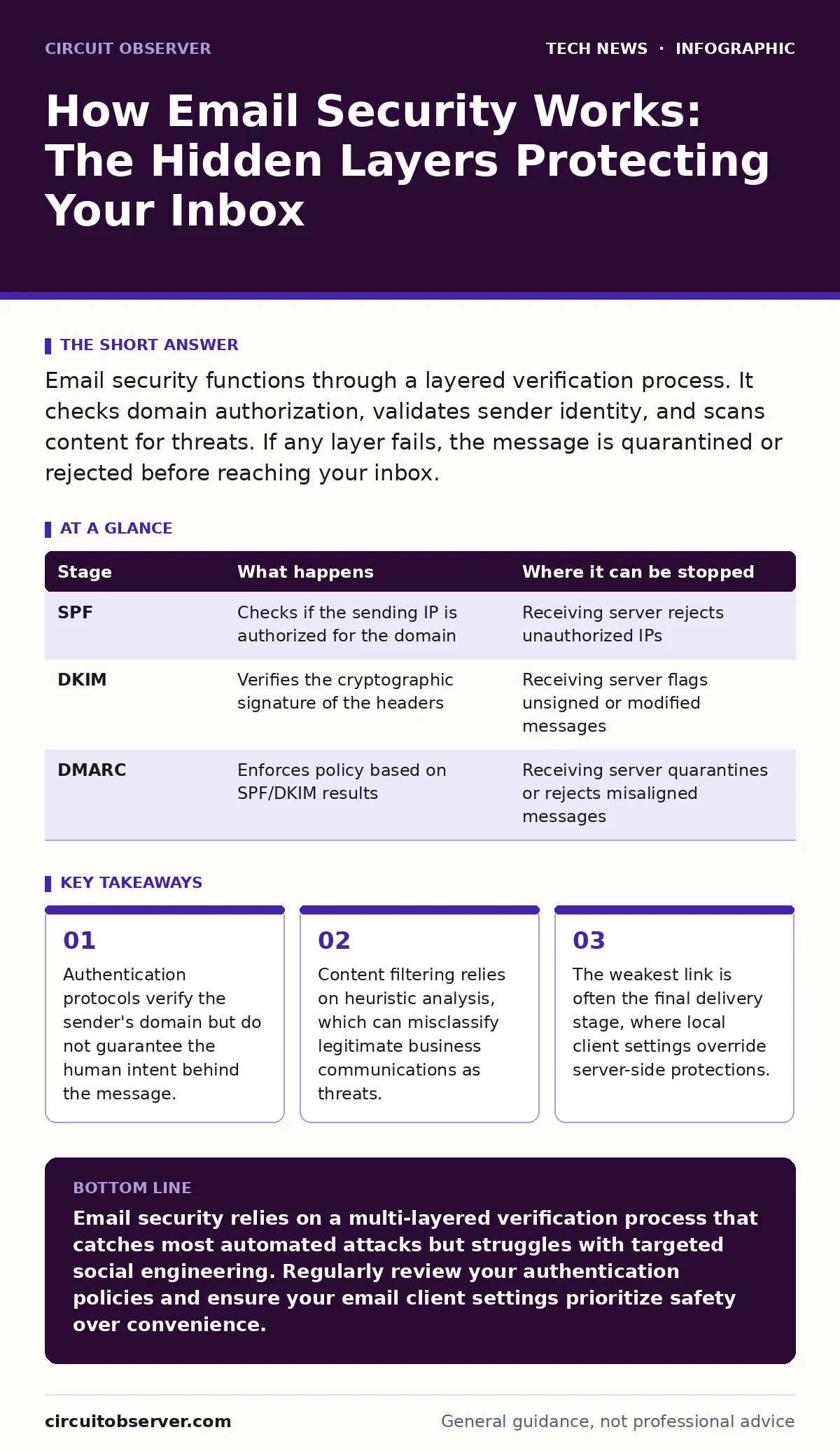
Email security functions through a layered verification process. It checks domain authorization, validates sender identity, and scans content for threats. If any layer fails, the message is quarantined or rejected before reaching your inbox.
The Journey of an Email Packet
When you send an email, it does not travel in a straight line. It hops through multiple servers, each performing a specific check. Understanding this path reveals why some attacks slip through while others are blocked instantly. The security of this journey depends on the cooperation of every server in the chain.
The process begins with the Simple Mail Transfer Protocol, or SMTP. This is the standard language servers use to talk to each other. It is reliable but fundamentally insecure by default. Without additional layers, anyone can spoof a sender address. This is why modern security relies on external verification mechanisms rather than trusting the SMTP header alone.
Stage 1: Domain Authorization Check
The first line of defense is Sender Policy Framework, or SPF. This is a DNS record that lists which IP addresses are allowed to send email for a specific domain. When a receiving server gets a message, it checks the sender's domain against this list. If the IP address is not listed, the check fails.
This mechanism prevents basic spoofing where an attacker claims to be from a trusted domain. However, SPF has a blind spot. It only checks the envelope sender, not the "From" address you see in your inbox. An attacker can use a different domain for the envelope while displaying a trusted name in the header. This is why SPF alone is insufficient for full protection.
Stage 2: Header Integrity Verification
The next step involves DomainKeys Identified Mail, or DKIM. This protocol adds a cryptographic signature to the email headers. The sender signs the message with a private key, and the receiver verifies it using a public key published in the DNS. This ensures the message has not been altered in transit.
If the signature is missing or invalid, the message is flagged. This protects against tampering, where an attacker modifies the content after it leaves the sender. However, DKIM does not verify who sent the message. It only confirms that the content matches the signature. A compromised server can sign a malicious message with a valid key. This is a common misconception about digital signatures.
Stage 3: Policy Alignment Decision
The final authentication step is Domain-based Message Authentication, Reporting, and Conformance, or DMARC. This policy tells the receiving server what to do if SPF or DKIM fails. The domain owner can specify that failing messages should be rejected, quarantined, or accepted with a warning. DMARC also requires the "From" address to align with the authenticated domain.
This alignment is critical. It closes the loophole left by SPF and DKIM. If the visible sender domain matches the authenticated domain, the message passes. If not, the DMARC policy applies. This step reduces the success rate of phishing attacks significantly. However, it relies on the domain owner configuring the policy correctly. Many organizations set their policy to "none" for monitoring, leaving them vulnerable.
| Stage | What happens | Where it can be stopped |
|---|---|---|
| SPF | Checks if the sending IP is authorized for the domain | Receiving server rejects unauthorized IPs |
| DKIM | Verifies the cryptographic signature of the headers | Receiving server flags unsigned or modified messages |
| DMARC | Enforces policy based on SPF/DKIM results | Receiving server quarantines or rejects misaligned messages |
Content Inspection and Threat Detection
Authentication ensures the sender is who they claim to be. It does not ensure the content is safe. Once the envelope passes, the message enters the content inspection phase. This is where most users think security happens, but it is actually the second layer.
Stage 4: Static and Dynamic Analysis
The receiving server scans the message for known threats. This includes checking attachments against a database of malware signatures. It also analyzes links to see if they point to known malicious sites. This is static analysis, which is fast but limited to known threats.
For newer threats, servers use dynamic analysis. They open the attachments in a sandbox environment, which is an isolated virtual machine. This allows the server to observe the behavior of the file without risking the main system. If the file tries to connect to a command server or modify system files, it is blocked. This method catches zero-day exploits but increases processing time.
Stage 5: Heuristic and Behavioral Filtering
Not all threats are malware. Some are social engineering attacks that use clean files and safe links. To catch these, servers use heuristic filtering. This involves analyzing the text for patterns associated with phishing, such as urgency, requests for credentials, or mismatched sender names.
Machine learning models also analyze user behavior. If an employee normally receives emails from a specific vendor and suddenly gets a message from a similar but different domain, the system flags it. This contextual awareness is powerful but prone to false positives. Legitimate business changes can trigger alerts, causing friction for users.
The Final Mile: Client-Side Risks
The server has done its job. The message is now in the user's inbox. This is where many security controls end. The email client, such as Outlook or Thunderbird, is the final barrier. If the client is misconfigured or compromised, all previous layers are bypassed.
Stage 6: Local Rendering and Execution
When you open an email, the client renders the HTML content. This can include tracking pixels, which are invisible images that report when you open the message. It can also include active content, which is rarely allowed but can be forced through vulnerabilities in the rendering engine.
The client also manages attachments. If you double-click a file, it executes on your local machine. This is why endpoint protection is vital. Even if the server missed a threat, the local antivirus or application control policy can stop it. For users on macOS, understanding the specific security settings for external attachments is necessary to prevent accidental execution. Similarly, Windows users should ensure BitLocker is enabled to protect data at rest, though this does not stop execution.
Limits and Trade-offs
No security system is perfect. Each layer adds complexity and potential points of failure. Understanding these limits helps you manage expectations and adjust your defenses.
The primary trade-off is between security and deliverability. Aggressive filtering can block legitimate business emails. This causes delays and frustration. Organizations often relax settings to avoid this, creating gaps. The second trade-off is privacy. Content inspection requires the server to read your emails. This raises concerns about data handling and compliance.
Imagine a scenario where a trusted vendor sends an invoice with a macro-enabled Excel file. The server allows it because the sender is authenticated and the file signature is valid. The user opens it, and the macro executes. The server cannot know the intent of the file. This is why user training and endpoint controls remain necessary.
For teams relying on remote work security, the risk increases as devices connect from untrusted networks. Email clients may behave differently outside the corporate firewall. Ensuring consistent security policies across all access points is challenging but necessary.
Maintaining the Defense Chain
Security is not a one-time setup. It requires ongoing maintenance. DNS records must be updated when IP addresses change. DKIM keys must be rotated periodically to prevent compromise. DMARC reports must be reviewed to identify ongoing abuse.
If you manage open-source software security, you must also monitor for vulnerabilities in your email server components. Outdated software is a common entry point for attackers. Regular updates and patching are non-negotiable.
For organizations with data center security constraints, ensuring that email servers are isolated from other services is critical. This prevents lateral movement if the email system is compromised.
The bottom line is that email security is a chain. The strength of the chain is determined by its weakest link. That link is often the user or the local client. Strengthening these areas provides the most significant improvement in overall security.
Key takeaways
- Authentication protocols verify the sender's domain but do not guarantee the human intent behind the message.
- Content filtering relies on heuristic analysis, which can misclassify legitimate business communications as threats.
- The weakest link is often the final delivery stage, where local client settings override server-side protections.
Email security relies on a multi-layered verification process that catches most automated attacks but struggles with targeted social engineering. Regularly review your authentication policies and ensure your email client settings prioritize safety over convenience.
Frequently asked questions
Does enabling SPF and DKIM guarantee my email is safe?
No, these protocols only verify the sender's identity and message integrity. They do not scan for malware or phishing content in the body of the email.
Why do legitimate emails sometimes go to spam?
This happens when content filters misinterpret the language or structure of the message. It can also occur if the sending IP has a poor reputation due to previous spam activity.
Can I disable email scanning for faster performance?
You can reduce the depth of scanning, but disabling it entirely exposes your organization to malware and phishing. The performance impact is usually negligible for modern servers.
How often should I rotate my DKIM keys?
Keys should be rotated annually or immediately if there is any suspicion of compromise. This limits the damage if a private key is leaked.
How this guide was produced: written by the Circuit Observer editorial team with AI assistance, checked against the public references listed below, and reviewed when the facts change. See our editorial policy or report an error.