Hardware security keys provide cryptographic proof of identity that remote attackers cannot clone. They do not protect against physical theft, coercion, or poor backup habits. Proper use requires understanding the difference between phishing-resistant authentication and simple password storage. Misusing them as the sole security layer creates single points of failure that compromise your entire digital presence.
Misreading: Keys are immune to all forms of theft
Correct reading: A hardware security key prevents remote cloning of your identity, but it does not protect against physical theft. If an attacker steals your key along with your unlocked device, they gain immediate access. The key only provides the second factor. The first factor usually remains your presence at the device. Imagine a scenario where a thief picks your pocket. They now hold the cryptographic token.
If your phone is unlocked, they can approve login requests instantly. Physical security remains the foundation. You must treat the key like a physical wallet. Losing it is not just an inconvenience; it is a credential compromise. Store keys in a secure location when not in use. Enable device-level encryption to ensure the stolen key is useless without the device password. This combination stops casual theft from becoming a full account takeover.
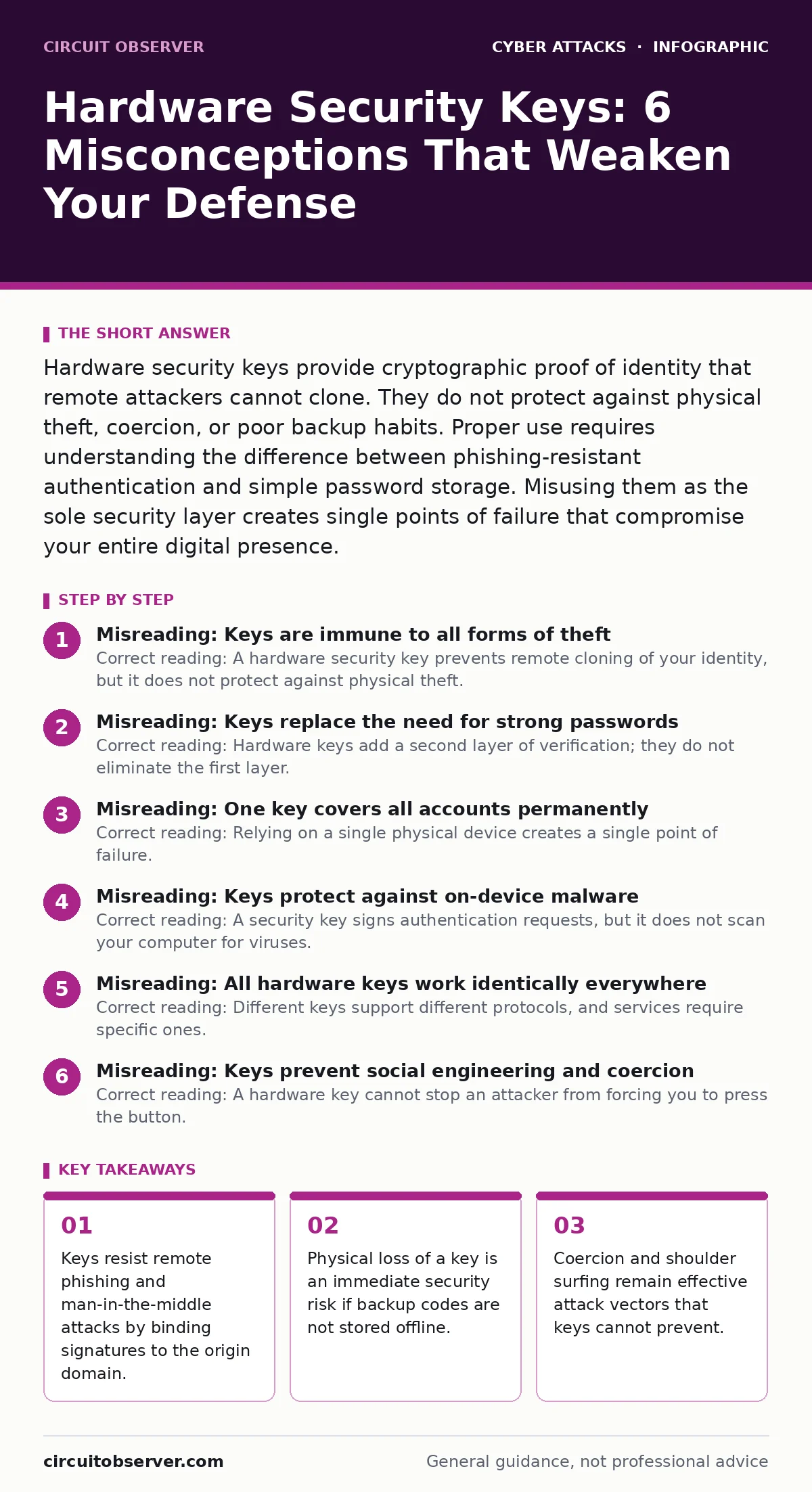
Misreading: Keys replace the need for strong passwords
Correct reading: Hardware keys add a second layer of verification; they do not eliminate the first layer. Most systems still require a password or PIN before prompting for the key. If your password is weak, an attacker can brute-force it on the local device before the key is ever involved. The key proves you possess the token, not that you know a secret. Suppose you use "123456" as your password.
An attacker with physical access to your laptop can reset your password or bypass the login screen entirely. The key remains useless if the operating system is compromised. Use unique, complex passwords for every account. Combine them with the hardware key for defense in depth. The key protects against remote phishing. The password protects against local brute-force attacks. Both mechanisms address different threat models. Ignoring password strength leaves the first door wide open.
Misreading: One key covers all accounts permanently
Correct reading: Relying on a single physical device creates a single point of failure. If that key breaks, is lost, or is damaged by water, you lose access to every account attached to it. Most services allow only one or two recovery methods. If you do not have backup codes, you are locked out. Suppose your only key falls into a river. You cannot recover your email, bank, or work accounts.
The cryptographic seed inside the key is non-recoverable. You must register multiple keys for critical accounts. Use one daily driver and keep a backup in a safe deposit box. Register recovery codes as a third option. These codes are single-use and should be printed on paper. Store them separately from your keys. This redundancy ensures that hardware failure does not equal identity loss. Planning for failure is part of the security design.
Misreading: Keys protect against on-device malware
Correct reading: A security key signs authentication requests, but it does not scan your computer for viruses. If your device is infected with keylogging malware, the attacker can steal your password. They may also capture session cookies that bypass the need for re-authentication. The key cannot see what happens on your screen after login. Imagine a scenario where you click a malicious link. Your browser installs a trojan.
The trojan steals your active session token. The attacker accesses your account without ever needing the security key. The key only protects the login moment. It does not protect the session. Keep your operating system and browser updated. Use browser isolation or sandboxing for risky activities. The key is a gatekeeper, not a bodyguard. It checks your ID at the door, but it does not watch you inside the room.
Misreading: All hardware keys work identically everywhere
Correct reading: Different keys support different protocols, and services require specific ones. Some older systems only accept U2F (Universal 2nd Factor), while modern systems prefer FIDO2 (Fast Identity Online 2) or Passkeys. A key that supports only U2F may not work with new passkey implementations. Suppose you buy a basic key for banking. You try to use it for a new cloud service that requires FIDO2.
It fails. You are stuck. Check the protocol support before purchasing. Look for keys that support both U2F and FIDO2. This ensures backward compatibility and forward readiness. Not all keys support NFC (Near Field Communication) for wireless use. Some require USB-C, others Lightning. Mismatched connectors or protocols lead to frustration and potential lockouts. Verify the service requirements before enrolling the device.
See also: What Is Replay Attacks: How Recordings Compromise Your Systems · How Do One Time Passwords Work: The Mechanics Behind Secure Access
Misreading: Keys prevent social engineering and coercion
Correct reading: A hardware key cannot stop an attacker from forcing you to press the button. Social engineering attacks target the user, not the cryptography. Suppose an attacker calls you, pretending to be IT support. They convince you to insert your key and press the button for a "security check." You grant them access willingly. The key validates the request perfectly.
The system sees a legitimate authentication event. The attacker now controls your account. This is a human failure, not a technical one. Train yourself to verify the identity of anyone asking for authentication. Never press the key unless you initiated the login request. Be wary of unsolicited calls or messages. The key is a tool, not a shield against manipulation. Human awareness is the final line of defense.
Misreading: Keys encrypt my files and data
Correct reading: Security keys authenticate identity; they do not encrypt storage. Using a key for login does not mean your hard drive is encrypted. If your device is stolen, the thief can remove the drive and read the data if it is not encrypted at rest. The key only controls who can log in. It does not control what data is stored. Suppose you use a key to access your cloud storage.
The cloud provider encrypts the data. But your local laptop files remain readable by anyone with physical access. Enable full disk encryption on your devices. This ensures that even if the key is stolen, the data on the drive is unreadable without the device password. Authentication and encryption are separate controls. Use both for complete protection. The key opens the door. Encryption locks the safe inside.
Key takeaways
- Keys resist remote phishing and man-in-the-middle attacks by binding signatures to the origin domain.
- Physical loss of a key is an immediate security risk if backup codes are not stored offline.
- Coercion and shoulder surfing remain effective attack vectors that keys cannot prevent.
- Mixing FIDO2 and U2F protocols on the same account can create compatibility gaps.
Frequently asked questions
Can I use a hardware key on my phone?
Yes, if the key supports NFC and your phone has an NFC reader. You tap the key against the back of the phone to authenticate. Some keys also support Bluetooth for wireless pairing with mobile devices.
What happens if my key battery dies?
Most hardware security keys do not use batteries. They draw power from the USB connection or the NFC field. If your key has a battery, it usually lasts for years. Check the manufacturer specifications to confirm the power source.
Do security keys work with all websites?
No, only websites that support FIDO2 or U2F protocols accept hardware keys. Major providers like Google, Microsoft, and GitHub support them. Smaller or older sites may only support SMS or app-based codes. Check the security settings of your specific accounts.
Can I share a hardware key with family members?
No, each key should be tied to a single individual’s identity. Sharing keys complicates audit logs and accountability. If one person leaves the organization or relationship, revoking access becomes difficult. Each user should have their own dedicated key and backup.
How this guide was produced: written by the Circuit Observer editorial team with AI assistance, checked against the public references listed below, and reviewed when the facts change. See our editorial policy or report an error.